Trialing a Community Conversation on AI for the Citizens' Track

As we start to explore how the Citizens’ Track on AI might catalyse and support community dialogues on AI around the world I’ve thinking about the kinds of agendas, activities and resources that we might need to create or curate.
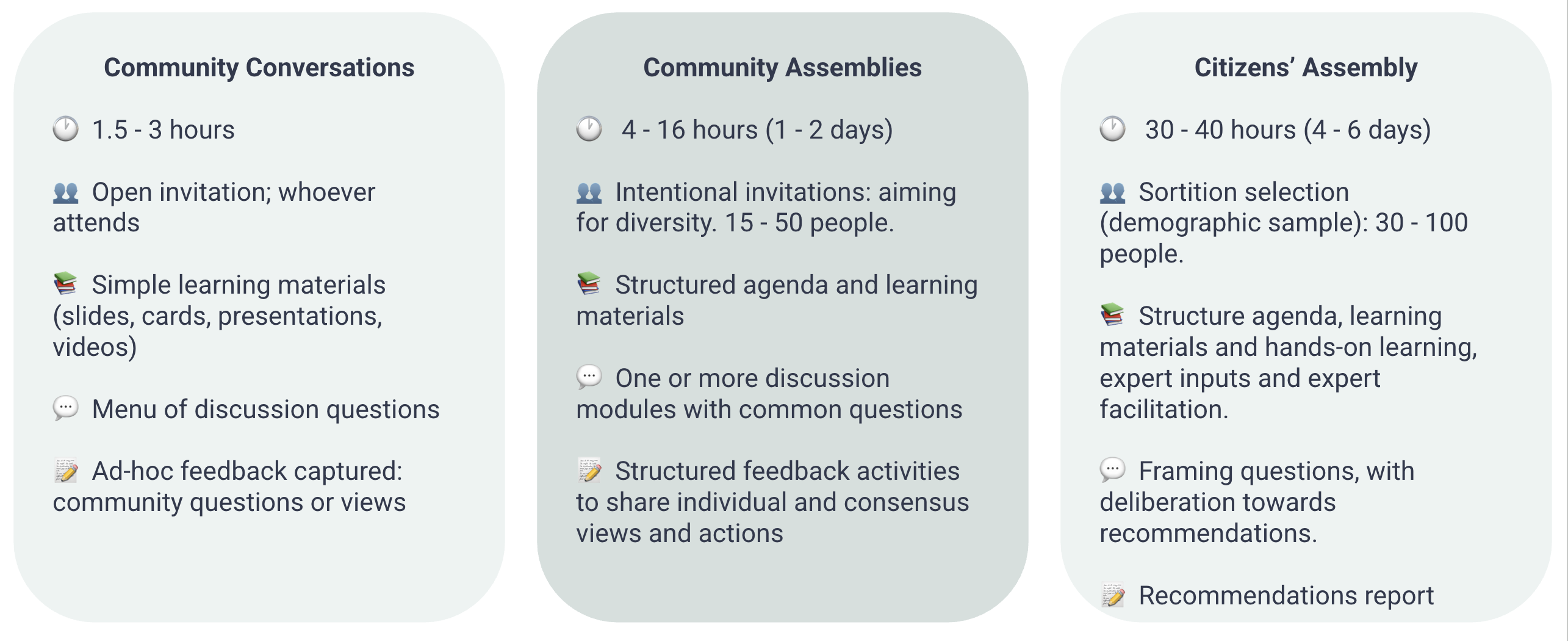
Broadly, I’ve been thinking of this in terms of three modalities: short community conversations, longer and more structured community assemblies, and much more formal citizens’ assemblies.
These each differ in terms of length, recruitment, preparation and facilitation required, and the kinds of outputs they might generate.
Yesterday I had the opportunity to try out an agenda for a short Community Conversation with the Randwick Women’s Institute: facilitating an hour of conversation for a group of around 30 women aged between 40 - 80 at a local village hall as an input to the groups monthly meeting.
Doing this has been a way to work through:
-
How could the Citizens’ Track provide accessible agendas, activities and resources for community conversations and assemblies?
-
What do we need to consider in both resource design, and facilitator guidance?
-
How can resources be adapted or localised to different contexts?
-
What do we want to record from community conversations, and how can we make this straight forward for facilitators?
This write-up captures some of my learning in response to these questions.
1. Agenda, resources & delivery
I only had a hour for the session, and as Women’s Institute meetings are used to having a speaker, rather than a workshop, I designed the session in three parts:
- Learn - Approx 30 minutes
- Discuss - Approx 15 minutes
- Express - Approx 10 minutes
The room was set-up with six small tables, with around five people at each.
I intentionally avoided using a presentation or slides, both to have a session that can work in venues without technology - but also because I find that can constrain the flow of a session too much.
Activity 1 - Ice Breaker: Images of AI (15 mins)
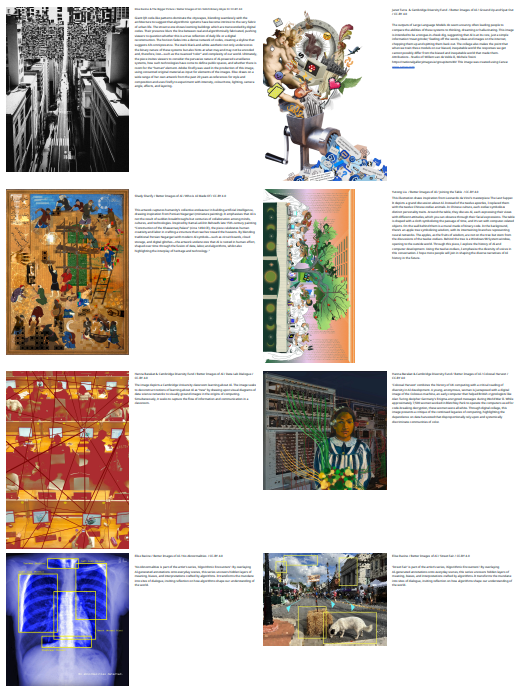
I’ve created a set of images, mainly drawn from the fantastic Better Images of AI collection, with a few extra I’ve added to capture additional perspectives, and which I’ve printed on A4 card in full colour with the artists statement, or a brief description of the image, on the back.
I gave each table 6 or 7 images each to look at, and invited people to spend some time selecting an image that resonates with how they currently feel about AI.
We then invited volunteers to show their chosen image to the group, and share why they had chosen it. I then reflected back to the group any additional themes the issue could raise (taking a ‘yes, and’ approach to build on participant contributions).
What worked well
I really like using this activity because:
- It immediately de-centres the digital - and focusses attention on wider aspects of AI in society;
- The images pick up on all sorts of different issues around AI, from the potential use of AI in medical discovery, to concerns about critical mineral extraction, or AI slop, and through to the use of AI in creativity;
- People start to share stories of how they are engaging with AI;
- Participants have the option of engaging with the artists statements on the back of the images.
Room for improvement
- A number of participants in the group were visually impaired. I had not thought about how the activity might work for blind or partially sighted participants.
- I’ve not checked the collection of images for ‘balance’ across a range of perspectives on AI, and need to think about whether the images provide routes into a full range of views on AI;
- I’m relatively familiar with the image set, and the ‘Yes, and’ issues that they can be used to raise - I need to experiment with the kinds of ‘facilitator notes’ that might be needed to help other workshop facilitators use the images effectively.
- The full set of cards (30+ full colour images) can be expensive to print. Large cards are important to be able to show them to the whole group… but perhaps we need a smaller set, or to print more post-card sized sets, so that each table can have a copy of the full set.
Activity 2 - AI history & demo (10 mins)
I started with a quick quiz asking:
- When was the term Artificial Intelligence first coined or widely used?
- When did ChatGPT enter into public awareness?
The answers (1956 - at the Dartmouth Workshop; and November 2022) always generate good discussion in a group - and the opportunity to talk about how ideas of AI have been with us a long time (including in different forms long before 1956), and how generative AI has emerged into society very rapidly (most guesses in the group were that ChatGPT had been around since 2010 or 2015 at the latest).
I then ran a quick live demo of AI tools, describing briefly how I was using:
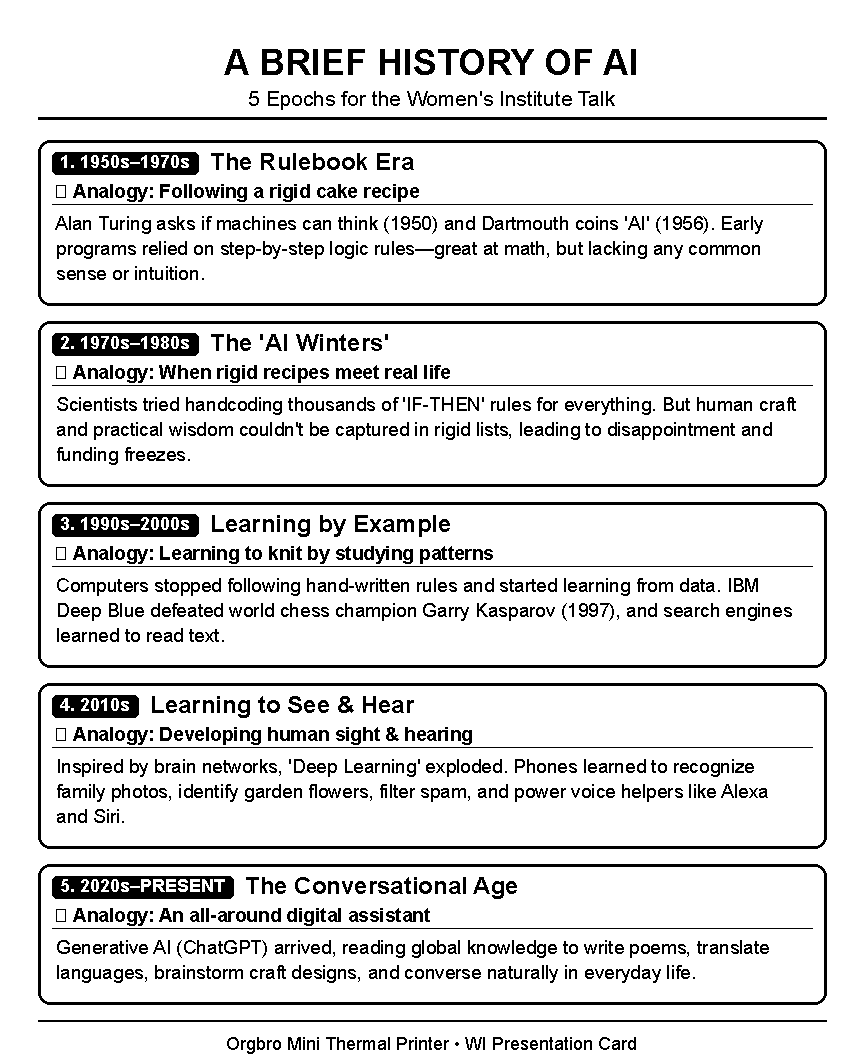
- MacWhisper speech-to-text on my local laptop to recognise by voice saying “Create and print me a short history of Artificial Intelligence for a talk to the WI”
- An agentic AI tool to respond to that prompt, and then…
- …send the history created to a cheap mini-receipt printer I had brought along, and that I’d reverse engineered the ability to print to using AI coding tools.
This has the effect of:
- Setting up some hooks for later discussion about the power of AI for those who have limited hands-on experience, and highlighting some of the emerging capabilities of agentic AI;
- Giving me a set of bullet points of AI history that I can then talk through - highlighting different era’s of AI development (expert systems, big data and neural networks, generative AI), and different familiar ways AI is present today (expert systems in the national health service ‘111’ telephone triage service; recommender systems on spotify or Facebook newsfeed; speech recognition on smart speakers; generative AI in chat bots etc.);
- Creating a discussion point around how well generative AI has tailored a talk to the group - and what assumptions, biases or stereotypes it has drawn upon.
After reading through, with ad-lib expansions, the history of AI this had generated, I also briefly touched on:
- A local history of AI - talking about W. Ross Ashby who used to work at Barnwood Hospital in Gloucestershire (the forerunner of Barnwood Trust who had part-funded renovation of the village hall we were in)
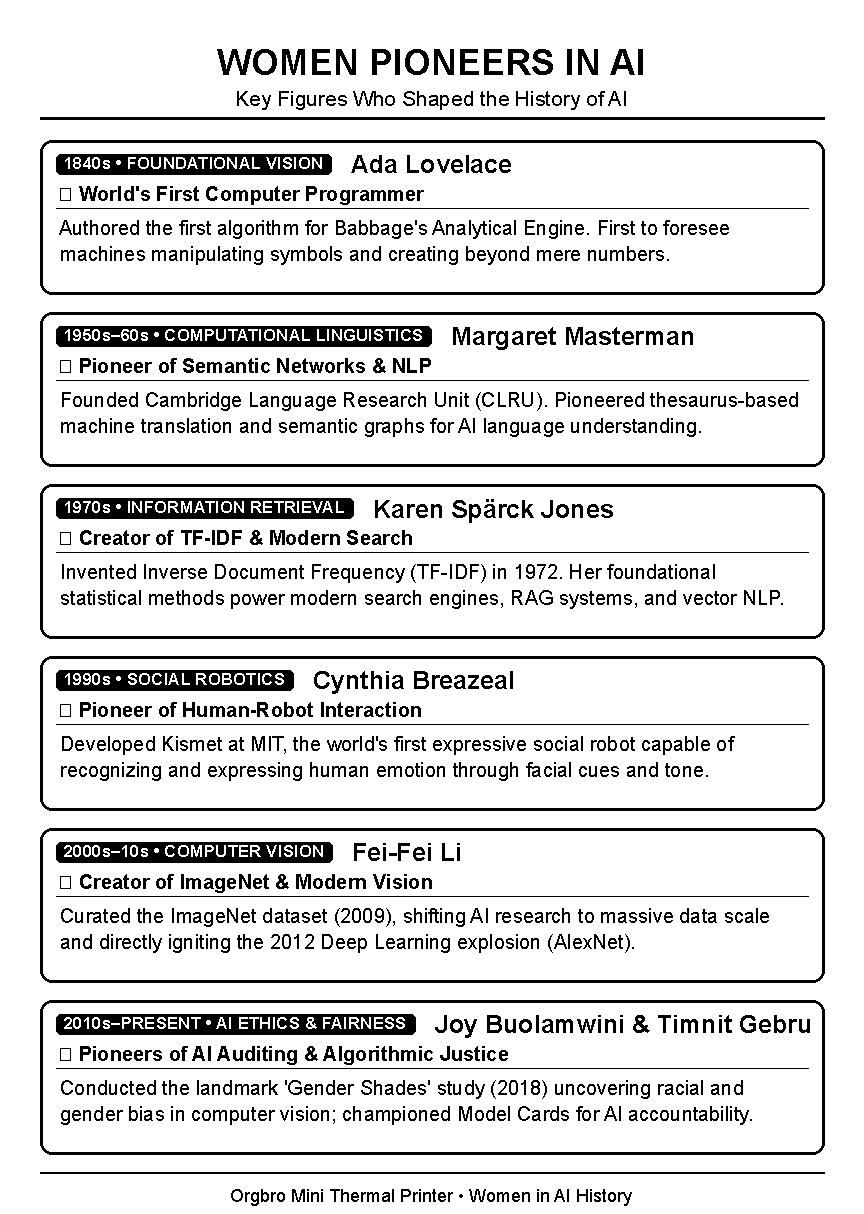
- Women in AI history (using another quickly generated ‘speakers receipt’)
What worked well
- The receipt printer interface was a good novelty… and I printed a set of different receipts of AI history as take-aways for people to take home;
- The tailored history helped make for an engaging presentation - and opened up discussion about how AI works: (E.g. “Will it know WI = Womens Institute?”, “How much does the output reflect the prompt we put in?”)
- Being able to talk through different applications of AI, and highlight a longer history, helps build participants confidence that they have views on AI and have already adapted to, or refused to use, AI-related technologies in their lives in different ways
Room for improvement
- Without a visual aid to show the stages of AI history, I suspect (and someone commented after in feedback) that my learning goal of explaining (a) how AI has developed over time; (b) that there are different forms of AI; wasn’t strongly met.
- The receipts are very small print - so not great as a take-away handout.
Activity 3: Where are heading? (5 mins)
I gave a (very) short presentation on five potential ‘Utopian’ or ‘Dystopian’ future trajectories for Artificial Intelligence, talking briefly about:
- Artificial General Intelligence
- AI bubble burst
- Health and education revolution
- De-skilling society and jobs crisis
- AI as normal technology
The goal of this was to set-up the idea that there are many different views about what the future of AI holds, and hopes and fears at many different levels.
What worked well
- The presentation could call back to themes that the group had already started to raise earlier in the Images of AI activity, and give some structure to this;
- I was able to talk about differences of opinion about what AI might bring.
Room for improvement
- While I tried to present a balance of views on each point, I’m not sure I managed to get this spot on. It might be helpful to have slides/visual aids with attributed quotes on different sides of each debate raised. These could also act as a useful key to look back-on later in discussions.
- I felt uncomfortable in a very short presentation leaving points on a ‘fear’, and so tended towards ‘fear’ then ‘hope’ in my presentation… but feedback from one participant after was that this had placed too positive a spin on the presentation of AI - which was not the intention.
Activity 4: AI Futures - Protopian ideas (15 mins)
Inspired by recent conversations with Liz Barry about the Protopian Prize, I invited groups to discuss on their tables their near future visions of AI: not as big dystopia or utopias, but in terms of the “incremental progress” we might see.
I gave each group a theme to focus on:
- Education
- Work
- Environment
- Economy
- Media
- Politics
After 10 minutes we shared brief feedback on our discussions in plenary.
What worked well
- Groups got straight into discussion, and participants used the opportunity to raise hopes and fears about AI;
Room for improvement
- In retrospect, the framing of this using a ‘Protopian’ lens put a particular spin on discussions: my goal had been to emphasise that we have a more productive discussion when we focus on futures that are neither “flawless nor catastrophic”, but I didn’t set this up well - and some participants felt it was pushing too encourage engagement with AI, rather than being open to resistance and rejection.
Activity 5: Messages to decision makers (10 minutes)
My plan for this section had been to talk through the different people who can affect the future of AI, including:
- Us as individual - deciding whether we use AI or not
- Us as communities and collectives - developing agreements or norms about AI use
- Industry - through design of technology
- Governments - through regulation and investment
I was then going to ask people to write down the messages they would have for one or more of these actors based on their discussion, before we shared with the group, and ended with ‘dot voting’ on the messages the group felt were most important.
Of course, in an hours session, time ran short, and I simply asked people to write down a message they had for industry, government or community, and to hand those in at the end of the session.
This still generated some fantastic notes, though not from everyone, and we didn’t have time to discuss.
What worked well
- The messages shared are a good mix of questions, policy asks and ideas. Out of 31 people participating, I had 15 cards handed in.
- I happened to use lined index cards rather than post-it notes, and, it might just be that WI members just have exceptional handwriting, but the responses were so much neater and easier to write-up than on plain post-its!
- I think the idea that these messages would feed into Citizens Track was a useful hook.
Room for improvement / what next
- I need to think about how these messages would be included in any community conversation write-up.
Close, cake, conversations and feedback
We ended, as all WI meetings should, with tea and cake - giving a chance for some follow-up conversations and chats. These highlighted a number of additional things to think about:
- Learning handout - It would be useful to have a handout that summarises session content, and offers people signposting to further learning content.
- Actions handout - It may also be useful to have a handout capturing different actions people can take at individual, collective and policy engagement levels.
- This could help manage my concerns about the risks of leaving a session in a place of fear (because of the concern that this can lead to feelings of disempowerment) by making sure people can leave with signposting to positive choices and actions.
- As a menu of actions, this can remain balanced - covering actions from ‘learning to write better prompts’ to ‘resisting AI’ or ‘engaging in policy advocacy’.
Meta-reflections
Through preparing for, running and recording this workshop I was also aiming to explore two other aspects of the Citizens’ Track on AI:
-
Community Assembly Toolkit - How viable is it to create a library of activities and agendas that can be put together to run community conversations or community assemblies? What would this need to look like?
-
Recording feedback - How can we capture and share feedback from sessions? What’s the easiest way to record a workshop?
Early lessons for toolkit design
Yesterday morning I started trying to put together my agenda by creating a stand alone facilitators guide for each individual activity, and then assembling those into an agenda. I thought that I might then be able to use a list of IDs of activities to effectively describe the methodology of the session.
In practice, I realised creating good re-usable descriptions of each activity wasn’t going to be possible in the preparation time I had available, although I feel I’m starting to have a better sense of what each activity description could or should contain - and how activities might be framed in terms of a ‘learn’, ‘discuss’, ‘express’ structure.
On reflection, however, recording what happened in the session by including activity IDs alone feels limited. Or at least, it only captures a small part of the story of the learning inputs.
Early lessons for data capture
Writing up this workshop also gave me a chance to test the prototype data structure/standard I’ve been exploring, to build on our experiments with the PAVE Case Book.
The idea has been to come up with a kind of data package that can capture enough information to aggregate, route and amplify voices from public engagement - and allow filtering and sifting of inputs based on the who? what? how? where? and when? of the participatory process.
Populating a case for the Randwick WI AI workshop using the current multi-file template revealed quite a few rough-edges that will need work, and some challenges to navigate in the conceptual model:
- Is this a standalone participatory process?
- Is this a participant group as part of a repeated workshop?
It might start as one… but then become the other over time - and so the way we record data about it, or the data itself, might need to be mutable enough to cope with this.
The substance of the documentation itself - writing up the messages participants had shared, also raised some interesting questions. This particular set of messages felt comfortable to publish verbatim, as none contained excessive personal information, or needed any sort of moderation. But I can imagine future sessions where some degree of moderation may be required - either at point of publication… or by platforms aggregating data from different processes and wanting to apply different curatorial standards.
I also need to reflect more on the idea of ‘verification’ that I’ve done some very basic exploration of in the data standard description. I had been thinking that a photo of a session could act as some sort of verification point: but I’ve then realised (a) gaining consent to share photos is not always straight-forward; (b) unless photos are verifiably timestamped etc., or unless there are photos of the original post-it notes etc (which raises some questions about sharing handwriting samples) they don’t act as particularly strong verification of the session taking place.
Next steps: co-design workshops and cohort
Many of the lessons I’ve taken from yesterday’s experiments are lessons that other participation practitioners have already learned - and could likely have pointed out I might encounter in advance. Other practitioners will have addition opinions and perspectives to bring to how to design culturally appropriate, flexible and robust small, medium and large deliberative workshops.
That’s why my next step is to launch a call for participation in a series of co-design workshops to help fill in more details of what Community Conversation and Community Assembly agendas for the Citizens’ Track could and should be like. And to invite applications to join a month-long co-design cohort to start filling out more of the details.
Watch the Citizens Track website for more details of that coming soon.